MCTS to MCITP , 70-351 , 70-089 , 70-236 , 70-640 , 70-642 , 70-646 , 70-630 , 70-285 , 83-640

Thursday, July 29, 2010

70-642 ebook , 70-642 study material , Network InfraStrucutre Ebook

This is an Excellent Book for Beginner who want to learn Server 2008 Network InfraStructure and Configuring right from Scratch. This 70-642 Book Contains all the Information Required to become MCTS ( Network InfraStrucutre , Configuring ).


For Download Click Here

Wednesday, July 28, 2010

Step By Step Article to Restrict User from Registry Group Policy

Step by Step Configuring Group Policy in Windows 2003.

Windows 2003 has an excellent feature called Group Policy to allow , restrict and add permission to a specific OU ( Organizational Unit ) rather than applying policy on separate machines/Users.
This step by step article will help you enable to how block a user or group of Users from accessing Registry and Others Windows Feature that you disabled.

Step 1
First you need to Open “Active Directory Users and Computers”


Step 2
Right click on your Domain and Create a New OU


Step 3
Add the 3 Users to the OU.


Step 4
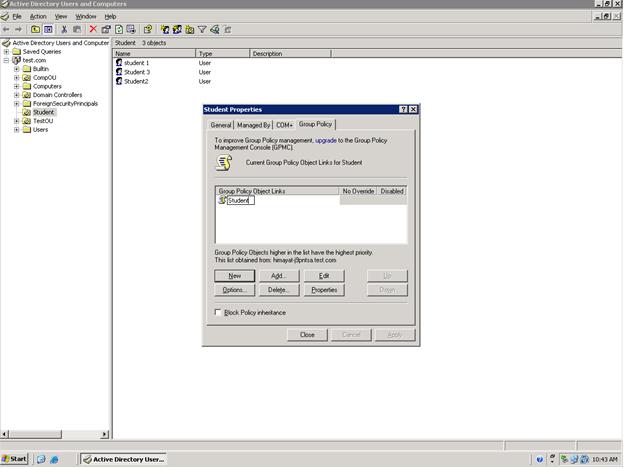
Right Click on OU that you created for Students, ( In my Case I have Created OU named “Student”)
And click “properties”, Move to Group Policy, Click New and Give the Group Policy a name.


Step 5
Click Edit and Move to User ConfigurationàAdministrative TemplatesàSystem


Step 6
Double Click on “Prohibit Access to Registry Editing Tools” , and check mark the “Enabled” Radio Button.


Step 7
Now to Check logon to the System Using any User that you added to the OU.
Type the Following Command at Run
Regedit


Step 8
If every thing works fine When you press enter you will see the following Window ,


Have a Nice Day J

Cheers,
Himayat Ullah Khan

Tuesday, July 27, 2010

Step by Step Block a User to Access Control Panel. , Group Policy to Block a User from Control Panel

Step by Step Configuring Group Policy in Windows 2003.


Windows 2003 has an excellent feature called Group Policy to allow , restrict and add permission to a specific OU ( Organizational Unit ) rather than applying policy on separate machines/Users.
This step by step article will help you enable to how block a user or group of Users from accessing Control Panel and Others Windows Feature that you disabled.

Step 1

First you need to Open “Active Directory Users and Computers”


Step 2
Right click on your Domain and Create a New OU


Step 3


Add the 3 Users to the OU.


Step 4
Right Click on OU that you created for Students, ( In my Case I have Created OU named “Student”)
And click “properties”, Move to Group Policy, Click New and Give the Group Policy a name.


Click Edit and Move to User ConfigurationàAdministrative TemplatesàControl Panel


Double Click on “Prohibit Access to the Control Panel” , and check mark the “Enabled” Radio Button.


Click Apply and ok. Close all the Windows and Open Run .
Type the following command

gpupdate /force 


The following window will appear


Write y and enter to reboot the system.
Now Log on to the any system by any user you entered into the OU. For Example “student 1”


You will see that the Control Panel Icon is removed from both the Start Menu and Also From My Computer.


Cheers,

Himayat Ullah Khan.